
Please, follow the steps below to install the required plugins:

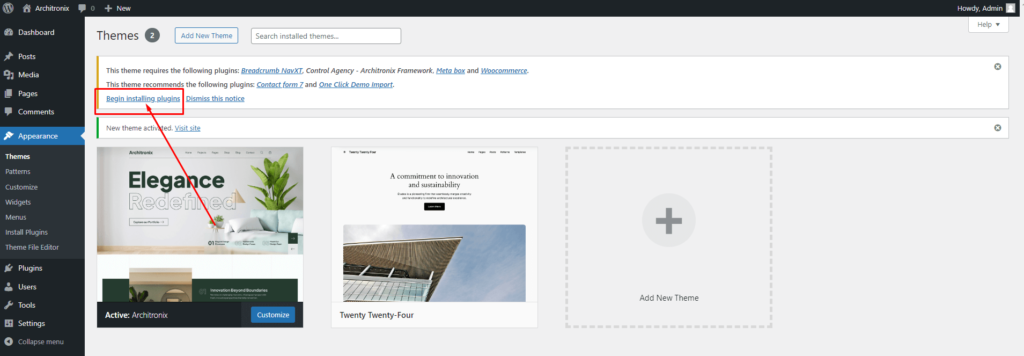
Step 1 – After activating the theme, you will be asked to install the required and recommended plugins, you can proceed by clicking on Begin installing plugins
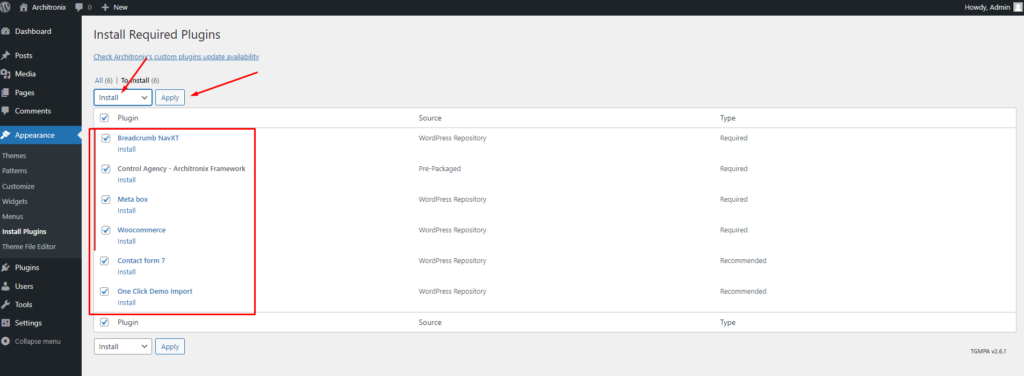
Step 2 – In the next page, check all the plugins that you want to install then on the drop down Bulk Actions, choose Install then click Install, the plugin installation process will start.
Step 3 – Check all the plugins that you want to activate then on the drop-down Bulk Actions, choose Activate and click Apply, and the plugin installation process will start. Wait for all the plugins to be activated then you can start customizing your website as you wish

Click here: Import demo data

If you have any further questions don’t hesitate to get in touch with our Support team.

Thanks for choosing our Architronix WordPress Theme.

Leave a comment

Your email address will not be published. Required fields are marked *

Related Post

/ Install Theme, Requirement

Introduction

Architronix goes beyond a mere WordPress Theme – it’s a powerful tool for architects and designers who want to make a lasting impression online. Showcase your talent, highlight your expertise, and attract potential clients with this feature-rich and visually stunning WordPress Theme. Absolutely! The Architronix WordPress Theme is constructed using Elementor and Gutenberg. This ensures…

/ Free Support, Requirement

Free Support

All of our items come with free support, and we have an advanced ticket system to handle your requests. Support is limited to questions regarding the theme’s features or problems with the theme. We are not able to provide support for code customizations or third-party plugins. If you need help with anything other than minor…

/ Install Plugins, Page settings

Contact form 7 Settings

You can replace your own email address. Here is plugin link: https://wordpress.org/plugins/contact-form-7/ Contact Form 7 can manage multiple contact forms, plus you can customize the form and the mail contents flexibly with simple markup. The form supports Ajax-powered submitting, CAPTCHA, Akismet spam filtering and so on. Showing here email template. reCAPTCHA Setup Integration reCAPTCHA protects…